Workflows & Automations

Stop Doing
Manually What
Systems Do Better.

Every lead that comes in, every appointment that gets booked, every deal that closes — there's a sequence of follow-up, nurture, and next steps that should happen automatically. Agora's visual workflow builder makes it happen — without code, without duct-taped integrations, and without anyone on your team remembering to do it.

Replaces: Make (Integromat) ActiveCampaign Keap
Agora Suite — Workflow Builder · New Lead Nurture
New Lead — 7-Day Nurture Sequence ACTIVE
Trigger
New Lead Form Submitted
Any source — website, ad, referral
Trigger
Action
Send SMS — "Thanks for reaching out!"
Fires instantly — within 60 seconds
Action
Action
Create CRM Contact + Set Pipeline Stage
Auto-populated from form fields
Action
Wait
Wait 1 Day
Then check for booking
Wait
Condition
Has appointment been booked?
If yes → stop. If no → nurture.
If/Else
YES → Booked
Send Confirmation + Remove from Nurture
NO → Continue
Send Day 2 Email — Value Content
847Enrolled
312Converted
37%Conv. Rate
∞Running 24/7
24/7Always Running
ZeroManual Follow-Up
∞Workflows You Can Build

Manual Follow-Up Is Why
Leads Go Cold.

It All Lives in Someone's Head

When follow-up depends on someone remembering to send an email, schedule a callback, or check in after a proposal — it doesn't happen consistently. Your best customers are the ones your team happened to remember. The rest slipped through because life got busy. Systems don't forget.

Speed to Lead Is Everything — and You're Losing It

Research shows you are 21 times more likely to qualify a lead if you respond within 5 minutes versus 30 minutes. Most businesses respond within hours — or the next morning. By then, the lead has already booked with a competitor who had an automated instant response running.

Duct-Taped Integrations Are Not a System

Stitching your CRM to your email tool to your scheduling tool with third-party connectors creates a fragile chain of integrations that breaks, costs money per task, and still requires someone to maintain it. Agora's workflows run natively inside the platform — no third-party glue required, no zap limits, no integration fees.

You're Leaving Nurture Revenue on the Table

Most businesses focus all their energy on new leads and ignore the people who didn't convert the first time. A structured nurture sequence that runs for 30, 60, or 90 days after an initial inquiry — automatically — recovers deals that went dark. Most businesses simply don't have one.

If It Happens More Than Once,
It Should Run Itself.

New Lead Follow-Up

The moment a new lead arrives — from any source — your system responds instantly, adds them to your CRM, and begins a structured nurture sequence.

  • Instant SMS reply fires within 60 seconds of form submission
  • CRM contact created, pipeline stage set automatically
  • Day 1, 3, 7 email nurture sequence begins
  • If no response after 14 days → re-engagement sequence fires

Appointment Sequences

Booking confirmed triggers a complete communication and preparation sequence — reducing no-shows and ensuring every appointment starts with a prepared prospect.

  • Instant confirmation email + SMS to the prospect
  • 24-hour reminder and 1-hour reminder fire automatically
  • No-show triggers re-engagement and rebooking sequence
  • Post-appointment follow-up with next steps fires same day

Proposal & Close Sequences

Send a proposal and the follow-up system takes over — tracking opens, sending timed nudges, and escalating when a deal goes silent.

  • Proposal sent → tracking pixel fires when it's opened
  • 24-hour follow-up: "Did you get a chance to review?"
  • 7-day follow-up if no response: value reminder email
  • Signed → payment request + onboarding sequence fires

Client Onboarding

When a deal closes or payment is received, your onboarding sequence launches automatically — delivering a world-class first impression without any manual effort.

  • Welcome email + next steps delivered within minutes
  • Day 3 check-in: "How's everything going?"
  • Day 7: introduce key resources and contacts
  • Day 30: satisfaction check + review request fires

Re-engagement & Win-Back

Leads and past clients who went quiet are your most underutilized revenue source. Automated re-engagement campaigns bring them back — without anyone on your team manually reaching out.

  • 30-day inactive trigger fires re-engagement SMS
  • 60-day sequence: seasonal offer or new service announcement
  • 90-day win-back: personal outreach from the assigned rep
  • Past client reactivation campaigns for seasonal businesses

Review & Referral Sequences

Your happiest customers are also your best marketing asset — but only if you ask them consistently. Automated review requests and referral campaigns run at the perfect moment.

  • Job complete / payment received → review request SMS fires
  • Follow-up if no review after 48 hours
  • 30-day post-close: referral ask with easy share link
  • Birthday or anniversary sequences for high-value clients

Build It Once.
Run It Forever.

1

Choose Your Trigger

Every workflow starts with a trigger — a new lead, a form submitted, a payment received, a date passed, a pipeline stage changed, or a tag applied. If it can happen in Agora, it can trigger a workflow.

2

Build Your Sequence

Drag and drop actions into your workflow — send an email, send an SMS, wait X days, check a condition, assign a task, update a pipeline stage, or fire any combination. No coding. No duct tape.

3

Activate and Move On

Turn the workflow on and it runs automatically for every contact that meets the trigger criteria — 24 hours a day, 7 days a week, for every lead simultaneously. You focus on the work that actually needs a human.

The Most Powerful Automation
Tool a Small Business Can Use.

Agora's workflow builder is the connective tissue of the entire platform — the engine that makes every other feature work together automatically.

Visual Workflow Builder

If It Feels Like
Coding, You're
Using the Wrong Tool.

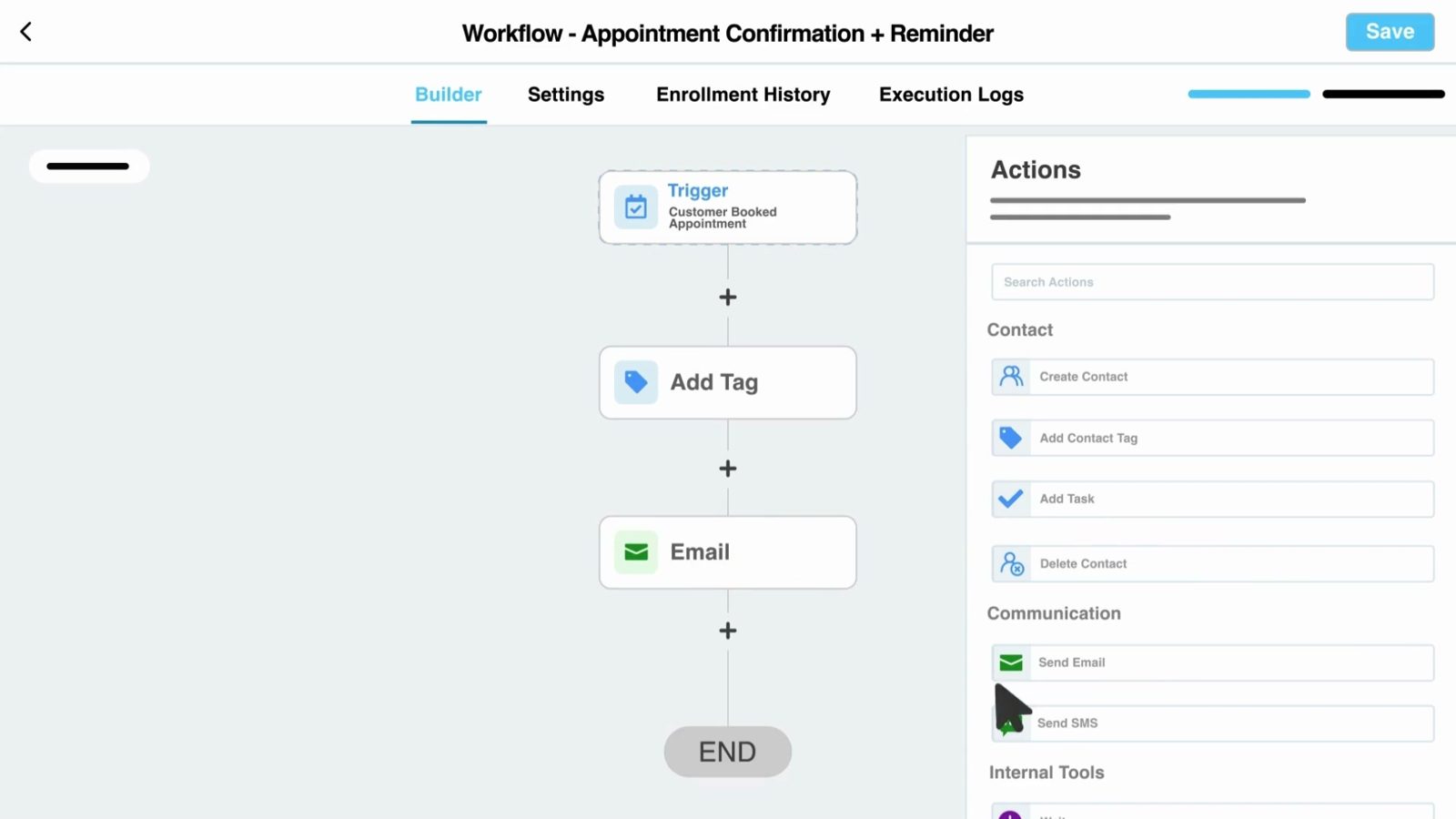
Agora's visual workflow builder uses a simple drag-and-drop canvas — you see every step of your automation laid out visually before you turn it on. Add triggers, actions, wait steps, conditional branches, and goal checks without writing a single line of code or maintaining a chain of third-party connectors.

  • Drag-and-drop canvas — build complex workflows visually
  • Unlimited steps, branches, and conditions per workflow
  • Test mode — run a workflow on a test contact before going live
  • Clone and edit existing workflows for rapid deployment
  • Pre-built workflow templates for the most common use cases
Multi-Channel Sequences

Email. SMS. Calls.
Tasks. All in One
Workflow.

The most effective follow-up sequences use multiple channels at the right moments — a text for immediacy, an email for detail, a task reminder for high-value prospects that need a personal call. Agora's workflows coordinate all of it from a single sequence, so every touchpoint is timed and intentional.

  • Email sends with full template library and personalization tokens
  • SMS sends with two-way conversation capability
  • Task assignments to team members at key sequence points
  • Internal notifications to alert your team when a lead takes action
  • Voicemail drops for high-value outreach sequences
Smart Conditions & Branching

Your Automation
Responds to What
People Actually Do.

The most powerful workflows aren't linear — they branch based on what a contact does or doesn't do. Agora's if/else conditions let your workflow respond intelligently: if they booked, send a confirmation; if they didn't, send a follow-up. If they opened the email, wait; if they didn't, try SMS. Your automation thinks so you don't have to.

  • If/else branches based on any contact behavior or attribute
  • Goal-based exits — remove contacts from a sequence the moment they convert
  • Time-based conditions — send only during business hours or specific days
  • Tag-based routing — different paths for different customer segments
Your Automation Responds to What People Actually Do.

Workflows That Touch
Every Part of Your Business.

Agora's workflow engine is the backbone of the entire platform. It's what connects a new lead to a booked appointment to a closed deal to a 5-star review — automatically, without anyone managing the process in between.

CRM & Pipeline

Workflow actions can create contacts, update fields, move pipeline stages, assign tags, and assign deals to specific team members — keeping your CRM accurate without manual entry.

Always Connected

Calendar Scheduling

A booking confirmation or cancellation can trigger entirely different workflow paths — so your system handles confirmation, reminder, and re-booking sequences automatically.

Always Connected

Payments & Invoicing

Payment received triggers your post-sale onboarding sequence. Failed payment triggers a recovery sequence. Every financial event has an automated next step.

Always Connected

Review Requests

The perfect review request timing — right after a job is complete or payment is received — fires automatically without anyone on your team remembering to ask.

Always Connected

AI Agents

Leads captured by your Voice AI or Sales Bot drop directly into workflows — so every AI-qualified prospect gets the same structured follow-up as a manually entered lead.

Always Connected

Reporting

Track enrollment counts, conversion rates, and goal completions per workflow — so you know which sequences are performing and which need refinement.

Always Connected

Agora vs. Standalone
Automation Tools.

Feature ActiveCampaign Keap
Visual drag-and-drop builder✓✓✓
Multi-channel (email + SMS + tasks)✓Email + SMS add-on✓
If/else conditional branching✓✓✓
Goal-based exits from sequences✓✓✓
Native CRM — no integration needed✓Separate CRM✓
Pipeline stage changes from workflow✓Limited✓
Payment triggers workflow✓✗✓
AI agent feeds directly into workflow✓✗✗
No per-task or zap fees✓✓✓
Included in platform subscription✓$29+/mo extra$199+/mo

ActiveCampaign is a strong email automation tool but lacks native pipeline, payment, and AI integrations. Keap ($199+/month) comes closest in capability but can't match Agora's native integration across every platform feature — and at a fraction of the cost.

Before You Book a Demo,
Read This.

The questions every business owner asks about automation before committing to a platform — answered straight.

No. Agora's workflow builder is a fully visual drag-and-drop interface — no code, no technical knowledge, no developer required. You choose triggers from a dropdown, drag in action steps, set wait times with a slider, and configure conditions through plain-English menus. If you can follow a flowchart, you can build a workflow. Our onboarding team also helps you build your first core sequences during setup so you're not starting from scratch.

For your core sales and marketing, no. Your CRM, email, SMS, calendar, payments, pipeline, and AI agents are all native to Agora, so the workflows that run your business don't depend on third-party connectors, per-task fees, or zap limits. Agora workflows can branch on whether a lead booked an appointment or remove a contact from a nurture sequence the moment they convert. For apps outside Agora, Agora integrates with Zapier, so you can still connect the other tools you rely on.

Unlimited. Agora places no cap on the number of workflows you can create or the number of contacts simultaneously enrolled across all workflows. You can have a new lead nurture sequence, an appointment reminder sequence, a post-sale onboarding workflow, a re-engagement campaign, and a review request sequence all running at the same time — each handling hundreds or thousands of contacts independently.

Yes. Agora workflows support email sends, SMS sends, voicemail drops, internal team notifications, task assignments, and phone call prompts — all within the same sequence. The most effective nurture workflows use multiple channels: an immediate SMS for speed, a follow-up email for depth, and a task assignment to the rep for high-value prospects that warrant a personal call. You control which channels fire at which steps.

No — and this is one of the most important features of a well-built workflow. Agora supports goal-based exits: you define a "goal" for the workflow (for example, "contact books an appointment"), and the moment a contact achieves that goal, they are automatically removed from the nurture sequence and moved to the appropriate next workflow — like an appointment confirmation sequence. This prevents converted leads from receiving generic follow-up emails after they've already taken action, which looks unprofessional and erodes trust.

Yes. Agora includes a library of pre-built workflow templates for the most common business use cases — new lead follow-up, appointment reminders, post-sale onboarding, review requests, re-engagement sequences, and more. Templates are customizable, so you can start from a proven structure and modify the messaging, timing, and conditions for your specific business. Our onboarding team also helps you configure the right workflows for your vertical during setup.

YOUR BUSINESS
SHOULD GROW WHILE
YOU SLEEP.

Every follow-up, every nurture sequence, every review request — running automatically, 24/7, for every contact simultaneously. That's what Agora's workflow engine delivers.

Schedule a Free Demo View Pricing
Everything in One Platform

Explore More Features.

Workflows & Automations is the engine that connects all 18 tools inside Agora — the feature that makes everything else run without manual intervention.

Courses & Memberships

Create and deliver engaging online courses and memberships with our user-friendly course builder.

Courses & Memberships

Replaces: Kajabi, Skool, Kartra, Teachable

See How It Works →

Social Planner

Plan, schedule, and publish your content across all social platforms in one streamlined calendar.

Social Planner

Replaces: Buffer, Hootsuite, Later

See How It Works →

Facebook & Google Reviews

Collect glowing reviews, respond in real-time with AI, and showcase social proof that earns trust and drives decisions.

Facebook & Google Reviews

Replaces: Birdeye, Podium, NiceJob

See How It Works →

Pipeline Manager

Track every deal, visualize stages, and close more sales with a pipeline built for clarity and control.

Pipeline Manager

Replaces: Salesforce, Pipedrive

See How It Works →

CRM

Manage every contact, conversation, and customer relationship in one place. Tag, segment, and filter your entire database.

CRM

Replaces: Salesforce, ZOHO, SugarCRM, Pipedrive

See a Free Demo →

Call Tracking

Know exactly which campaigns, ads, and pages are generating phone calls. Record, transcribe, and log every call to the right contact.

Call Tracking

Replaces: CallRail, Squaretalk, SalesLoft

See a Free Demo →

See all 18 features →